
Forgot Your iPhone Backup Password?
Here's How to Reset It
When you create your first encrypted local backup of an iPhone, iPad, or iPod touch, you set a password to protect it. This password is required to restore the backup or access its contents in apps like TouchCopy or iBackup Extractor.
If you can't remember your iPhone backup encryption password, you can reset it on your iPhone. We're going to show you how!
Quick jump to:
How to Reset the Backup Password on your iPhone
Watch the video below or read on for steps to reset your iPhone backup password.
- Open the Settings app on your iPhone.
- Tap “General”, then scroll down and choose “Transfer or Reset iPhone”.
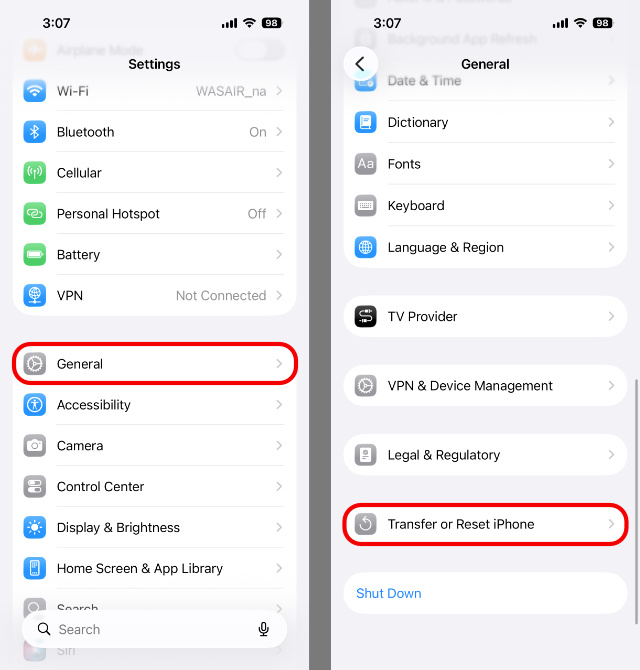
- Tap “Reset” and then “Reset All Settings”.
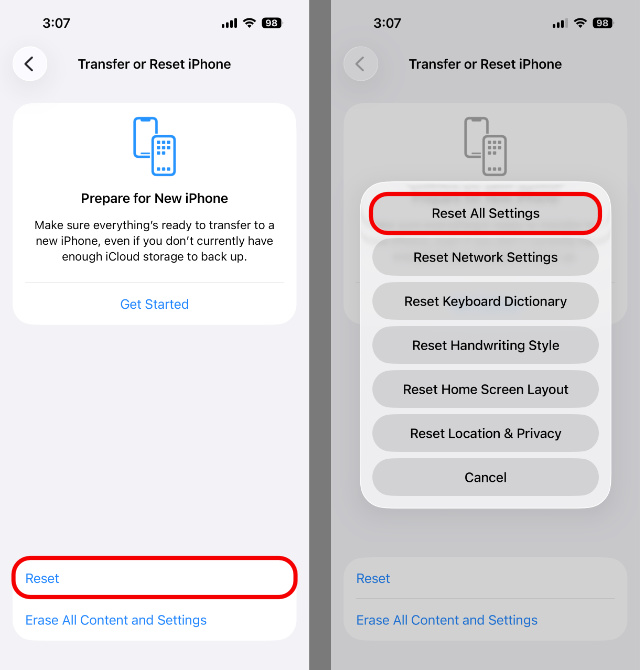
- Enter your iPhone's passcode.
- Tap “Reset All Settings” again to confirm the reset.
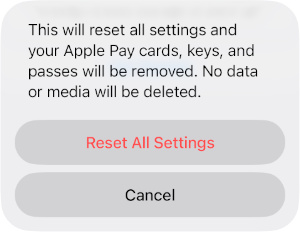
What will be reset?
Don't worry- none of your iPhone apps, data, media or other passwords will be deleted.
- Your iPhone's backup encryption password will be reset.
- All settings will be reset, including display brightness, Home Screen layout and wallpaper.
- Apple Pay cards, keys and passes will be removed (items present in your Apple Wallet).
Creating a New Backup
You can now reconnect your iPhone to your computer and create a new encrypted backup using TouchCopy, iTunes, Finder or the Apple Devices app.
You'll see that you can easily turn on or remove backup encryption using your desired backup app.
If you enable backup encryption, you'll be prompted to set a new password. This password will protect any backups you make of that device. Keep the password safe, because you'll need it if you need to save content from the backup to your computer using TouchCopy or iBackup Extractor.


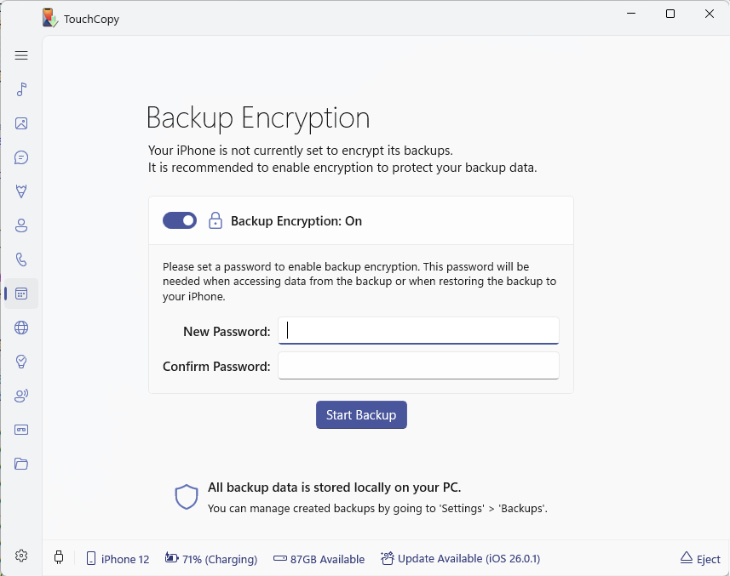
Did you know? TouchCopy offers a selection of different ways to backup your iPhone - a Full backup, and a Reduced (space-saving) backup - either of which can be encrypted!
FAQs
Will resetting all settings delete my data?
No. Resetting all settings won't delete data like apps, photos, or messages.
What does “Reset All Settings” remove?
It resets system settings (like display settings and Home Screen layout) and removes Apple Pay cards, keys, and passes. It also resets the backup encryption password.
Will this unlock or recover my old encrypted backups?
No. Existing encrypted backups still require the original password. Resetting the password only affects future backups you create after the reset.
What should I do after resetting the password?
Create a new encrypted backup and set a new password you can remember or store safely.

Popular FAQs
- What's the Difference Between Backup Types in TouchCopy?
- How to Change Where Device Backups are Made to and Read from in TouchCopy
- How to Backup iPhone to External Hard Drive
- TouchCopy is Stuck while Creating a Backup of my Device
- How to Recover from a Backup Failed Error Message
- Using TouchCopy with Encrypted Device Backups
- How to Create a New Encrypted Backup in iTunes
- How to Remove iPhone Backups in iTunes, Finder and iCloud
- How to Update iOS on iPhone or iPad