
How to Deactivate Your Software License Before Transferring to a New Computer
If you have an activation code for TouchCopy, Droid Transfer, or iBackup Extractor, you can activate the software on a certain number of computers based on your license type.
- Lifetime licenses can be activated on 2 computers.
- 12-month / 6-month licenses can be activated on 1 computer.
Activating the software with your license will unlock the full version and remove any trial limitations.
However, if you are replacing or retiring a computer, you may want to use your activation code on a different computer. To do this, you'll need to deactivate your license from the old computer. This will free up a space on your license, allowing you to then activate it on a different computer!
Deactivating Your License from Your Old Computer
To release your activation code for Droid Transfer, TouchCopy, or iBackup Extractor from your old computer, please follow the steps below.
- Launch the app on your computer.
- Access your license details:
- On PC, click Settings > "Activation Details".
- On Mac, connect your device, then click "License".
- Click the "Deactivate" button.
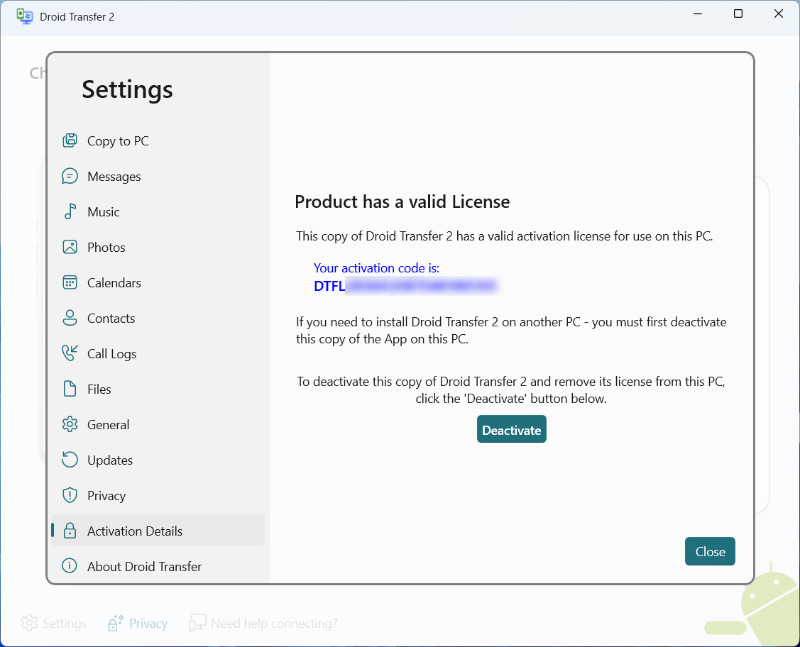
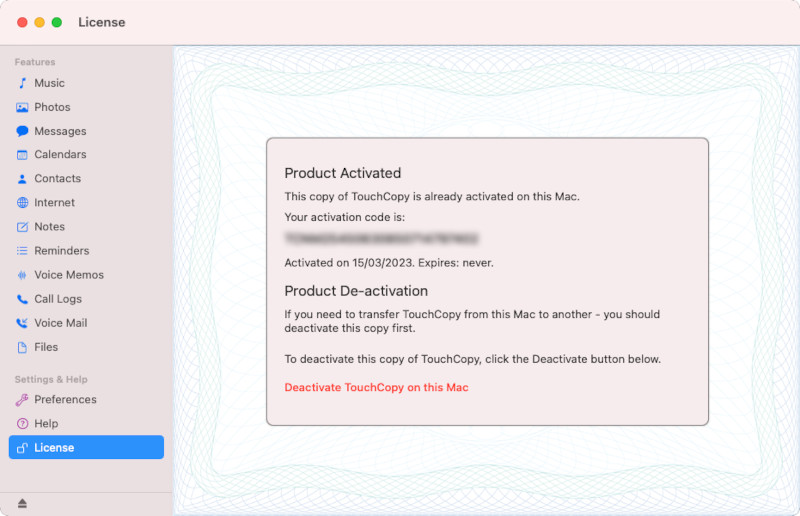
Once deactivated, you can use your existing activation code to activate your license on a different computer!
- How to activate Droid Transfer
- How to activate TouchCopy
- How to activate iBackup Extractor
- How to activate Tune Sweeper

Popular FAQs
- How to find your activation code after making a purchase
- How to Activate Droid Transfer
- How to Activate TouchCopy
- How to Activate Tune Sweeper
- How to Activate iBackup Extractor
- How to Activate Music Tag
- How to Activate Duplicate Sweeper
- How to Activate Wide Angle PDF Converter
- How to Activate Contact Transfer