
My TouchCopy activation code does not work
If you're having trouble activating TouchCopy, or your activation code isn’t working, this guide will help you resolve the issue.
- Check you're using the correct activation code
- Check if your license has expired
- Fix activation errors
Using the correct activation code
Please ensure you are using the correct activation code for your version of TouchCopy. Activation codes are specific to both the version purchased and the operating system (Windows or Mac) on which the software is installed.
Windows and Mac activation codes are not interchangeable .
TouchCopy (Latest Version)
- TouchCopy is the latest version in the TouchCopy series. See what's new in TouchCopy.
- If purchased from our website, you will have received an activation code for a Lifetime, 12-month, or 6-month license.
Download TouchCopy for Windows 10/11 Download TouchCopy for Mac
TouchCopy 16 (Legacy)
- Lifetime licenses start with TP16 (Windows) or TM16 (Mac).
- 12-month licenses start with RP16 (Windows) or RM16 (Mac).
Download TouchCopy 16 for Windows (64-bit) Download TouchCopy 16 for Windows (32-bit) Download TouchCopy 16 for Mac
Older Legacy Versions
If you purchased TouchCopy 09 or TouchCopy 12, your activation code may begin with TCP9, TCM9, TP11, or TM11.
Please note that these versions are no longer supported. TouchCopy 09 and TouchCopy 12 have not been updated since 2010 and 2015 respectively, and their activation codes are no longer valid.
Lifetime activation codes never expire and can be used on up to 2 computers by the same user.
6- or 12-month activation codes can be used on 1 computer and expire after the stated term. Licenses do not renew automatically.
Expired Licenses
If you have a 6-month or 12-month TouchCopy activation code, please check that your license has not expired.
TouchCopy will let you know if you attempt to activate it with an expired license (activation error 16).
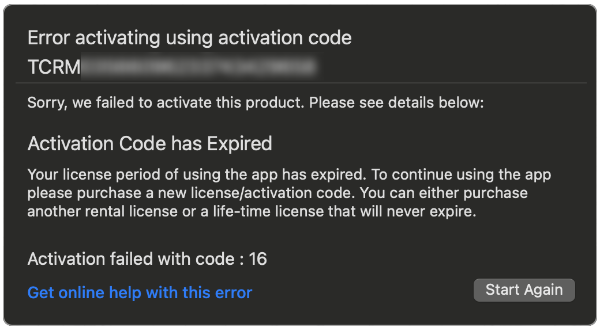
To continue using the full version of TouchCopy, you'll need to purchase a new license. Please note that 6- and 12-month licenses are not subscriptions and do not renew automatically.
Purchase TouchCopyTroubleshooting Activation Errors
If you've confirmed that you're using the correct version of TouchCopy and that your license hasn't expired, the issue may be related to an activation error.
If TouchCopy displays an activation error code (such as error 1, 3, 5, 16, 18, or 99), please see our support article for step-by-step guidance on resolving activation errors in TouchCopy.


Popular FAQs
- How to Activate TouchCopy
- How to Download and Install TouchCopy on a Windows PC
- Fix: Unable to Install TouchCopy on a PC or Mac
- What to do if TouchCopy will not open on your PC
- How to Create a Desktop Icon for TouchCopy
- How do I Transfer my Software License to my New Computer?
- How do I Reinstall my Registered Version of TouchCopy?
- Is TouchCopy Safe? Here’s Why You Can Trust It
- What are the TouchCopy Trial Limitations? (Evaluation period)
- 12-month vs 6-month vs Lifetime activation codes
- How to Deactivate Your Software License Before Transferring to a New Computer
- I have Forgotten my TouchCopy Password
- What's New in TouchCopy?